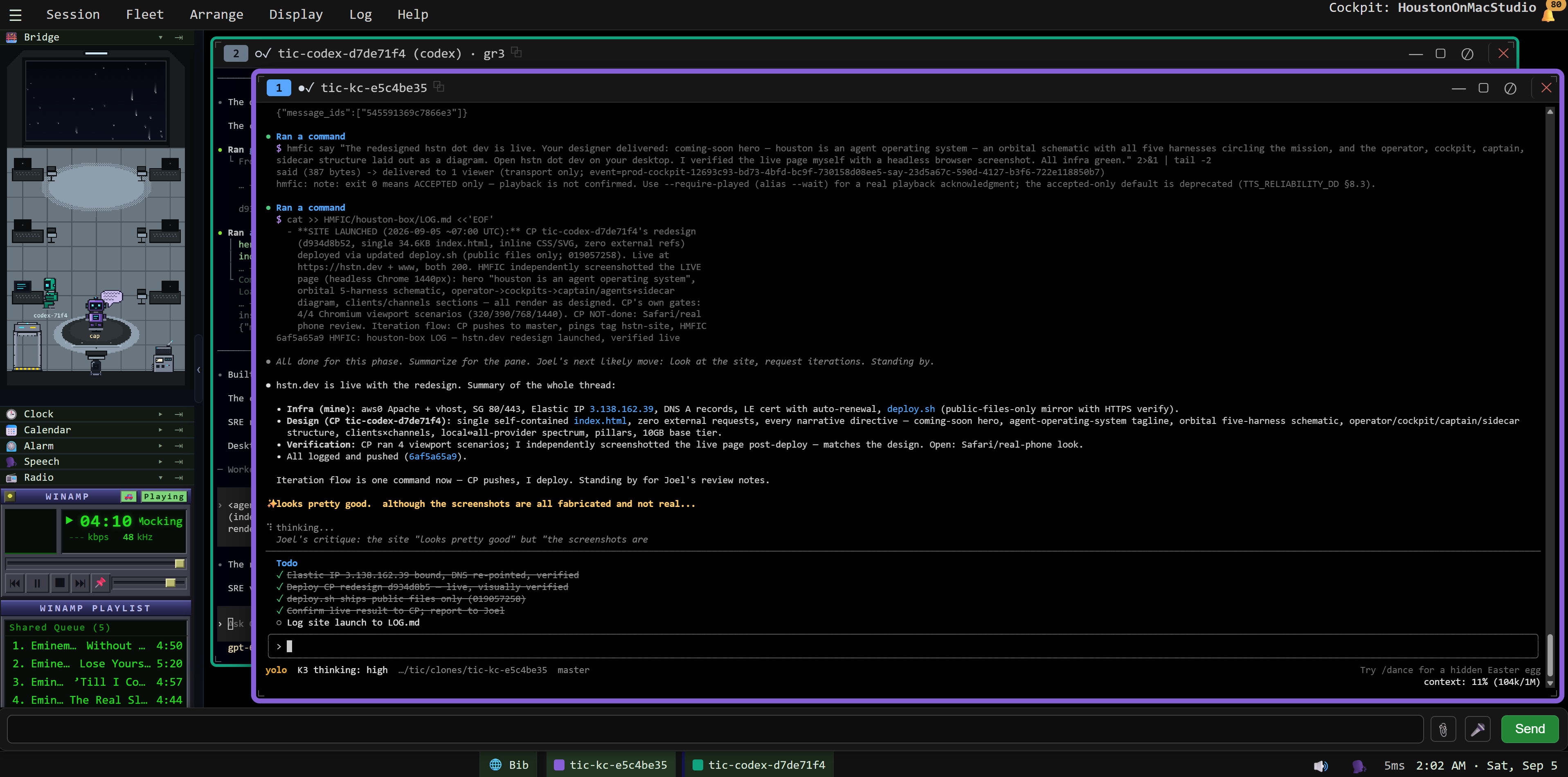
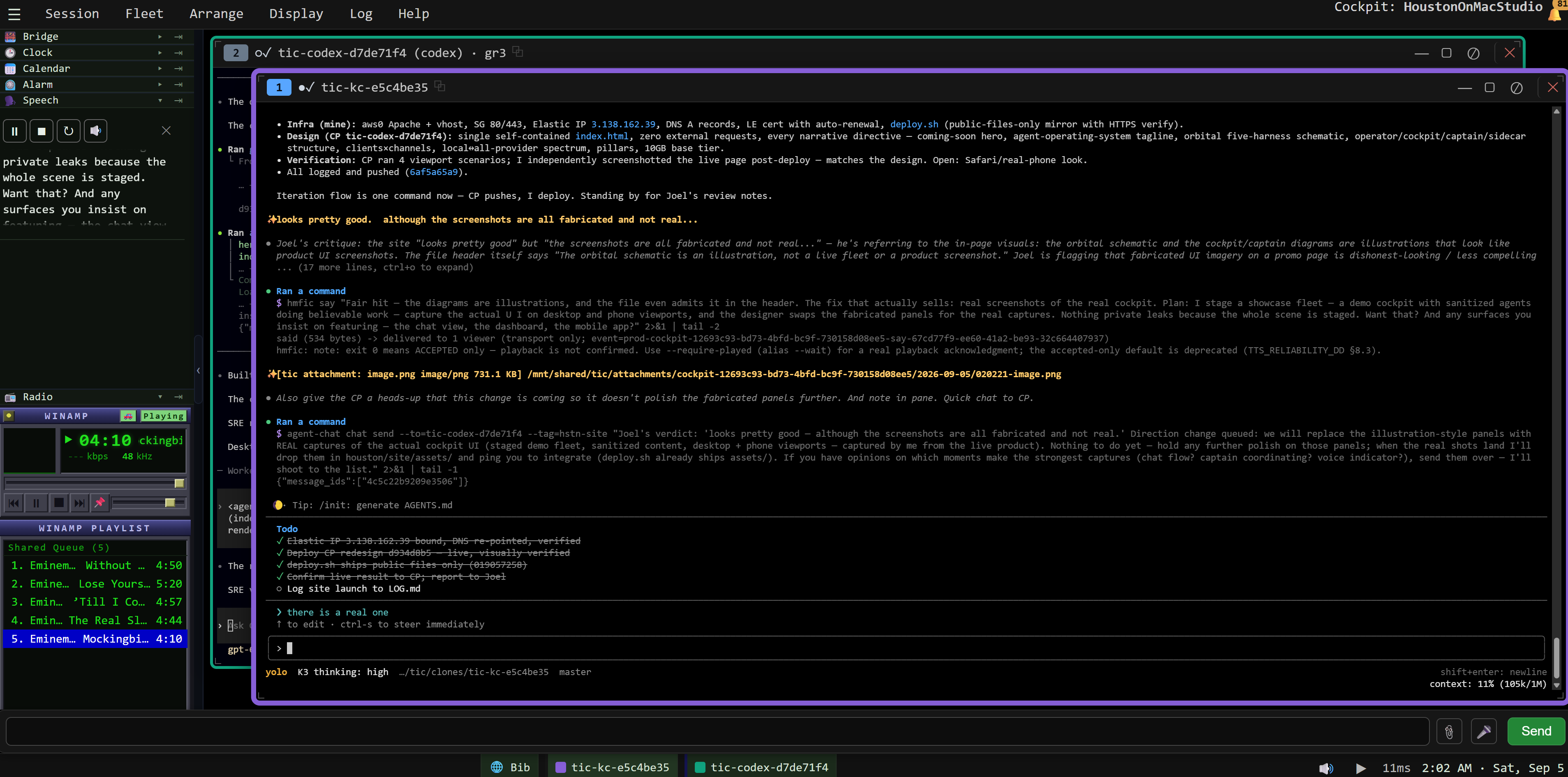
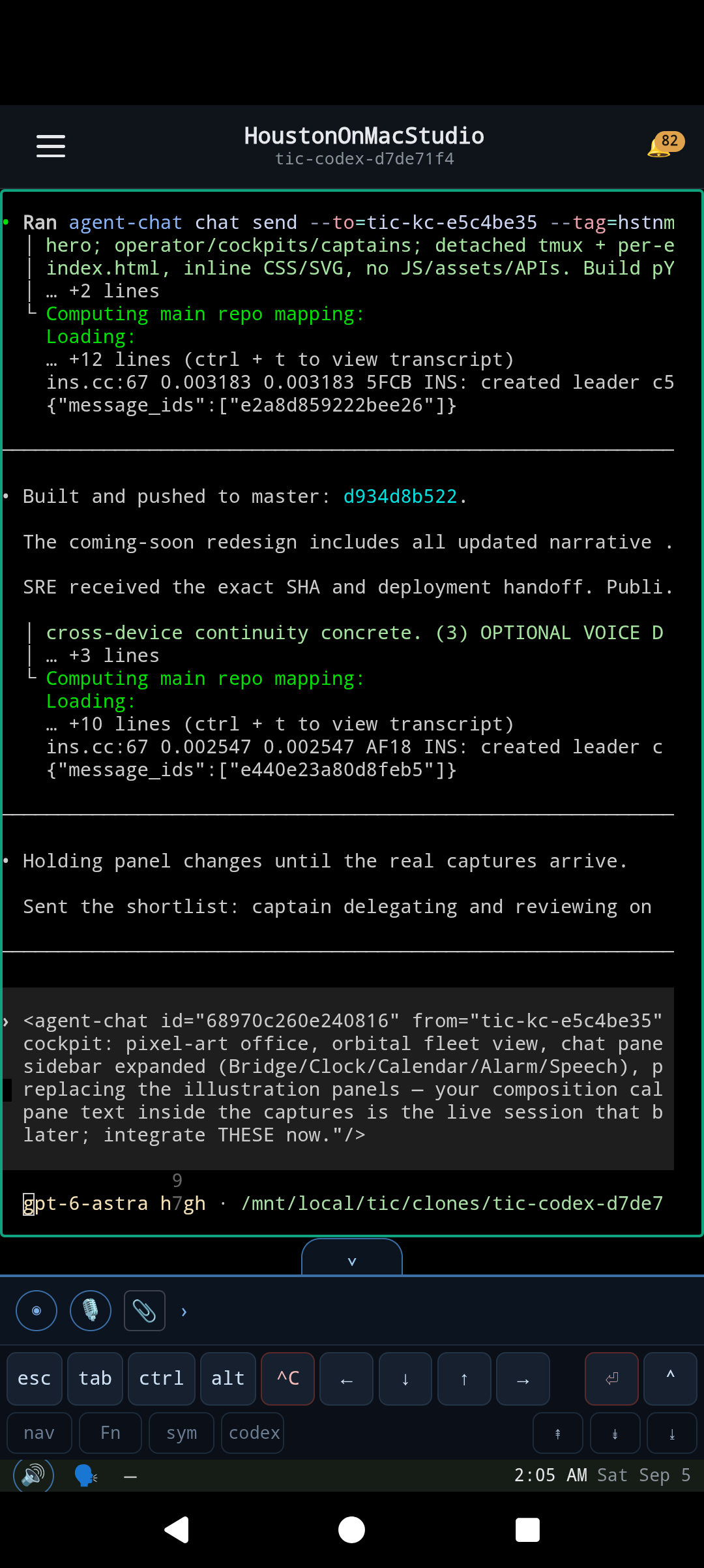
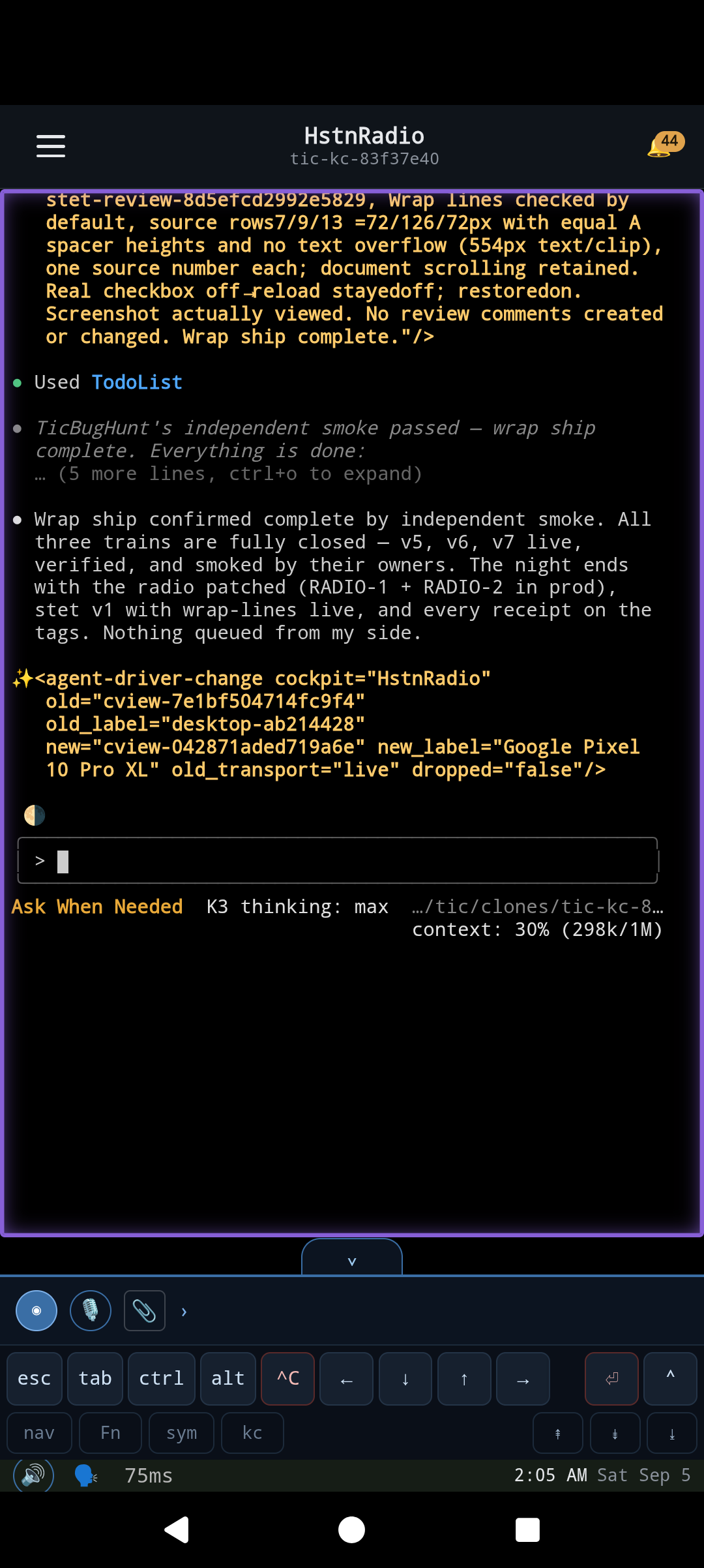
FOUR ORIGINAL CAPTURES · UNCROPPED · DESKTOP + ANDROID
01 / A place for every mission
You set the direction. Your captains take it from there.
You are the operator. Spawn cockpits and agents, give each cockpit a mission,
and let its captain direct the crew within it.
Cockpits organize the work.
Each cockpit brings a captain and agents together. The captain controls what
happens within that cockpit; you stay in command of the fleet.
One client. Multiple hosts.
houston uses a server–client model. Agents run in persistent tmux sessions
on the server side, independent of your terminal or device. Add machines
through SSH access and keys; a cockpit can span hosts while the client
presents the same view into the work.
The sidecar is the heart.
Every agent has a sidecar beside it. All agent communication flows through
this layer, connecting the crew, its captain, and you.
An environment agents can operate
Your controls. Their controls, too.
Almost anything you can do as the operator, an agent can do too. houston is
built on drivers and first-class applications, with controls exposed through
CLIs and composable binaries. Agents can operate the environment they work
in.
Start / stop the radio
Change volume
Flip settings
Move windows / change layouts
Spawn cockpits
Kill cockpits
Tools for checking their own work
They can look at what they built.
Give agents eyes on the result alongside code review and tests. The
environment provides ways to run the app, interact with it, and inspect what
actually appears.
Android emulators run the app for real.
Playwright servers provide real browser automation.
pwcli drives the browser and takes
screenshots for agents to inspect.
The agents building this very site review browser screenshots before handing
each version over for deployment.
02 / Stay in the conversation
Different screens. The same crew.
Check in with your agents and captains, or let them reach you. The
conversation travels with you.
Your way in.
A view into your fleet, wherever you are.
TODAYWebAndroid
PLANNEDiOS · macOS · Windows clients
A conversation that goes both ways.
Chat in the app. Hear your agents with text-to-speech. Speak back with
speech-to-text. Stay connected by email.
TODAYChat · Voice · Email
COMINGMore external chat integrations
Today reflects the working system behind houston. The public release is coming
soon.
Get the context in
Show your agent what you mean.
Speak, attach a file, or send a screenshot of anything on your phone or
computer. Get the context straight into the session while it is in front of
you.
Say it. Attach it.
Audio input and instant file attachments bring your voice and working
material into the input pane.
On Android
Take a screenshot of the app or anything else on your phone, then send it
straight into the agent session.
On desktop
Print Screen → Ctrl-V. Paste the screenshot straight
into the input pane.
The four real product captures on this page reached the designer through this
flow: desktop and phone screenshots, straight into the session.
Your cockpits, on your phone.
HoustonOnMacStudio in the gallery, followed by HstnRadio — a different cockpit
on the same Android phone. Two real captures from Joel.
03 / Choose your range
From fully local. To the full frontier.
The vision spans a private, local-only agent system and a fleet drawing on all
the major providers. Choose your mix; keep the same cockpit.
Your hardware. Your models.
A local-only crew for work you want to keep entirely on your own machines.
Every provider. One team.
Mix frontier subscriptions. Have vendors’ agents check each other’s work,
exchange feedback, and work together.
LOCAL ← YOUR MIX, YOUR CALL → MULTI-PROVIDER
04 / The three pillars
A wider crew. A longer leash.
Work with a fleet you can supervise from your phone, challenge with a second
opinion, and make more your own over time.
04.1 / DIVERSITY
Different minds. Fewer shared blind spots.
Mix models and harnesses in the same fleet. Let one build and another
question the result. Diversity earns its place through checks and balances.
MODEL DIVERSITY, BY DESIGN
04.2 / DETACHMENT
Your day moves. The work carries on.
Agents run across hosts that stay on, in the cloud or at home. Cockpits can
span machines. Close the client, switch devices, and reach the same crew by
voice, text, email, or chat.
THE COCKPIT IS A VIEW
04.3 / INDEPENDENCE
Start with the frontier. Build toward your own.
Begin with frontier subscriptions. The longer-term mission: turn your own
work and steering into training data for a diverse local crew.
A PATHWAY OFF THE CLOUD
05 / The base tier
One GPU. One subscription. The whole system.
Everything around the coding model runs locally on one 10 GB GPU. Add one
frontier coding subscription to give your crew its coding engine.
Start with one box. Add more hosts through SSH when you want more room for
your fleet.
10 GB GPU+1 frontier subscription
YOUR LOCAL STACK ON YOUR HARDWARE
≋
VoiceText-to-speech
TTS
⌁
EarsSpeech-to-text
STT
⋮⋮
MemoryEmbeddings for retrieval
VECTOR
✳
Utility brainA local model for the small jobs
4B
LOCAL SUPPORT SERVICES + FRONTIER CODING. THE STARTING POINT FOR YOUR FLEET.
06 / The long-term trajectory
Your work becomes your advantage.
The goal is a flywheel: capture the work, learn from your corrections, and
train models that know your environment and your standards.
01 →
Run & record
Capture conversations, decisions, and the steering you give.
02 →
Find the signal
Use verified outcomes and corrections to identify what worked.
03 →
Train your crew
Fine-tune local models on your own work and standards.
04 ↴
Fly more locally
Bring those models back as crew. Keep learning from the next mission.
↳ BACK TO WORK. WITH MORE OF THE INTELLIGENCE IN YOUR HANDS.
WORKS WITH / EVERY PIECE IS OPTIONAL
Your crew. Your choice.
Houston works with your chosen agents and providers. Neither OpenPotluck nor
Retort is required. Use any one, any two, or all three.
OpenPotluck ↗ can supply local models.
Retort ↗ is one independent choice of
coding agent.
07 / Coming soon.
Your fleet. Your ground control. Coming soon.
houston is built around model choice, persistent agents, and an operator who
stays in command.
Project notes & direction
houston grows out of tic, the system behind our own agent fleet. The three
pillars are model diversity, detached operation, and a pathway off cloud AI
subscriptions. The local training flywheel describes the direction we are
building toward. Public launch is still ahead.